1. menu Graphics
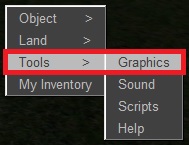
Right-click on the floor and select the menu TOOLS > GRAPHICS
2. dialogue Graphics
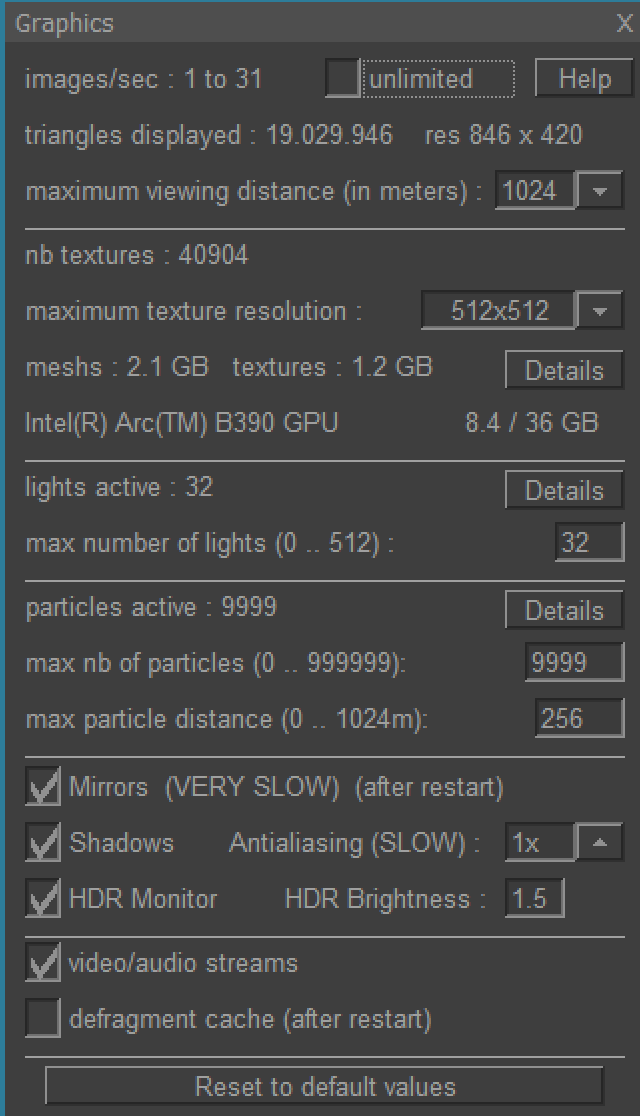 "images/sec" indicates how many images per second are displayed.
This value is limited to 60 if that's the standard frequency of your monitor.
By checking the 'unlimited' option you can measure how much your
PC could display without this limitation.
"images/sec" indicates how many images per second are displayed.
This value is limited to 60 if that's the standard frequency of your monitor.
By checking the 'unlimited' option you can measure how much your
PC could display without this limitation."max viewing distance" indicates how far you can see. By default 256 meters. If the display is too slow you can decrease this value.
"textures" indicates how much memory the graphics card uses to store textures. Reducing "maximum texture resolution" will reduce memory consumption but can make some textures blurry.
The name of your graphics card (GPU) is displayed, along with its total memory and your current graphics memory usage. If the graphics memory is full, Planet will crash with an error.
"lights active" indicates the maximum number of lights displayed. Some graphic cards slow down the display significantly at night when many lights are on, in that case decrease the value "max lights" to display only the lights near you.
"particles active" indicates how many particles (snow, smoke) are displayed. If the display is too slow you can try to decrease the value "max nb of particles" or reduce the distance at which particles are displayed "max particle distance".
"Mirrors" will switch Planet to ray tracing mode (after a Planet restart). Planet will crash if your PC does not support ray tracing. Ray tracing mode is much slower and uses more memory than normal mode.
"Shadows" displays shadows for all objects and avatars. This can however seriously reduce the number of images per second.
"Anti-aliasing" smoothes zigzags on oblique lines (2x, 4x, 8x or 16x times). In Raytracing mode, this option significantly slows down the display. In normal mode, you must first restart Planet.
"Monitor HDR" allows you to switch to HDR10 mode, if your monitor supports it. A standard monitor displays 16 million colors, while a HDR10 monitor displays 1 billion colors. The "HDR Brightness" setting lets you adjust your monitor if it's too dark or too bright. If you’ve chosen the right setting, switching between HDR10 and non-HDR10 modes should barely change what you see.
"video/audio streams" allows you to watch video or hear audio streamed from the internet. If you enable "decoded by GPU" (not always available), Planet will process video/audio fully in your graphic card (GPU); if this causes Planet to crash, disable this to process video/audio on your main processor (CPU).
You can check "defragment cache" from time to time if you have a non-SSD hard disk. The next time you start Planet, the large cache file on your hard disk will then be defragmented (it will take 5 min). This has no effect if you have an SSD hard disk, so electronic.
The "Reset to default values" button resets default values that are normally suitable for everyone.
3. For high-performance graphics cards
If you have a high-speed graphics card and your display is still jerky and doesn't reach 60 frames per second :
- for RADEON / AMD, check the RAL (Radeon Anti-Lag) option in the Windows control panel, Radeon Icon.
- for NVIDIA, set the "Low Latency Mode" option to "On" or "Ultra" in the Windows control panel, Nvidia Icon.
4. Refresh rate of your screen
If the CPU of your PC indicates 60% or more and you have a brand new laptop, you can check this:
click on the Windows desktop, Display Settings, Advanced Display Settings, and see how many Hz your screen is set to.
On some new laptops it's set to 144 Hz.
We changed it to 60 Hz, no difference and it is much faster (the PC has to calculate much less frames per second, of course)
5. menu Settings
In the menu "Tools > Settings", you have an option "old DISCARD (slow) mode (after restart)".
By default, Planet uses the modern "FLIP_DISCARD" mode, which is recommended as it uses less CPU.
However, we have noticed a small problem with Windows 10:
when the PC wakes up from sleep, Planet sometimes has a black border on the right and bottom of the window,
which isn't pretty. If this happens to you, check this option to use the old "DISCARD" method.
For Windows 11 or later, never check this option.
6. Distinguish between different types of lag
When you arrive at a new location where you have not been recently, the objects are first loaded into the cache on your hard drive. This takes a little while, it's normal. When everything is loaded, however, you can have several kinds of lag:
-
Your avatar has trouble moving, it's shaky, you can't turn the camera properly.
check in the menu Tools > Graphics how many frames per second are displayed. If it is below 20, reduce your viewing distance. If this does not improve things, be aware that your CPU (processor) is probably too slow (an i5 or equivalent is recommended for Planet).
-
Your avatar is frequently stuck in flight or while driving
This is probably because your PC has a HDD disk designed for archiving instead of a new SSD that allows for fast random read. Check the performance of your drive in 4k random reading. Installing Planet on an SSD can speed it up to 8 times compared to an HDD.
If you are unlucky enough to have an HDD, you can improve performance slightly by defragmenting the disk (in Windows, click on C: Properties, Tools, Improve Performance) and by defragmenting the Planet cache (in Planet menu Tools / Graphics / Defragment Cache).
You can buy an external SSD hard drive, connect it to your PC via USB cable and install Planet on it, you will also see a very significant improvement over a HDD hard drive.
-
When you click on a chair, it takes several seconds for your avatar to sit down.
It is the planet server that is overloaded and does not execute the scripts fast enough.
7. Which PC do you recommend for Planet ?
Planet is compatible with all graphics configurations. However, if you want to take full advantage of all its features, we recommend the following PCs.
A. Minimum Laptop Configuration
- Windows 11 Laptop
- 16, 32 or 64 GB RAM
-
PROCESSOR
-----------------------
Intel Core Ultra 9 288V
Intel Core Ultra 7 268V
Intel Core Ultra 7 266V
Intel Core Ultra 7 258V
Intel Core Ultra 7 256V
Intel Core Ultra 5 238V
Intel Core Ultra 5 236V
Intel Core Ultra 5 228V
Intel Core Ultra 5 226V
- Noise: 100% silent.
- Price (2026) : 800-1600 €
These 9 processors are part of the Lunar Lake lineup released in 2024
and contain a 130V or 140V integrated graphic card (Arc Graphics Xe2).
This is the first time a lightweight laptop contains a processor that supports
powerful graphics features such as ray tracing which enables mirrors on Planet,
WITHOUT having to buy a bulky gaming PC and an NVIDIA graphics card.
You can connect a large 4K HDR-10 external monitor to your laptop. Planet supports 4K (a screen resolution of at least 2000 x 2000), and HDR-10 (1 billion colors).
How much RAM will be allocated to the graphics?
If you choose 16 GB of RAM, up to 9 GB are available for the integrated graphic card.
If you choose 32 GB of RAM, up to 18 GB are available for the integrated graphic card.
If you choose 64 GB of RAM, up to 36 GB are available for the integrated graphic card.
We recommend selecting at least 32 GB of RAM for Planet, so that 18 GB are available for the graphics card.
B. Confortable Laptop Configuration
- Windows 11 Laptop
- 32 or 64 GB RAM
-
PROCESSOR
------------------------
Intel Core Ultra X9 388H
Intel Core Ultra X9 387H
Intel Core Ultra X7 368H
Intel Core Ultra X7 358H
- Noise: 100% silent.
- Price (2026) : 1800 - 3000 €
These four processors are part of the Panther Lake lineup released in early 2026
and contain a B390 integrated graphic card (Arc Graphics Xe3).
The B390 is about twice as fast as the 130V/140V models in the Lunar Lake lineup mentioned above. The B390 makes it possible to play demanding 3D games like CyberPunk on a laptop — all without noise or overheating.
You can connect a large 4K HDR-10 external monitor to your laptop. Planet supports 4K (a screen resolution of at least 2000 x 2000), and HDR-10 (1 billion colors).
Beware of this pitfall: the Intel Core Ultra 7 366H (the "X" is missing) has only 4 graphics cores instead of 12, so be sure to check for the "X": it indicates powerful graphics capabilities.
How much RAM will be allocated to the graphics?
If you choose 32 GB of RAM, up to 18 GB are available for the integrated graphic card.
If you choose 64 GB of RAM, up to 36 GB are available for the integrated graphic card
(See the image at the top of this page).
C. Desktop Computer Configuration (Tower)
- Gaming desktop PC, Windows 11
- CPU: i7 (Intel Nova Lake 2027 or AMD), 32 GB RAM
- graphic card: Nvidia RTX with 16 GB RAM DDR6 (or 24 GB if available)
GRAPHIK CARD
------------
RTX 4080 Super  16 GB GDDR6X
RTX 5070 Ti     16 GB GDDR7
RTX 5080        16 GB GDDR7
RTX 4090        24 GB GDDR6X
An RTX graphics card is probably three times faster than the B390 mentioned above, although the advantage seems less significant when it comes to ray tracing. However, this comes at the cost of power consumption (the RTX 4090 draws 450 watts, while an Intel Core Ultra X7 368H consumes only 25 watts with peaks of 80 watts), and in noise (unless you have a water-cooling setup, you’ll have several noisy fans generating between 45 and 55 dB(A), which is about as loud as a quiet vacuum cleaner).
- Price (2026) : 1200 - 2500 €
Beware: GTX cards do not support ray tracing (mirrors); you need an RTX card.
How much RAM will be allocated to the graphics?
The RTX graphics card will have its own DDR6 RAM,
which is separate from the CPU RAM.
For Planet, we recommend a Nvidia RTX graphic card with a minimum of 16 GB of DDR6 (or 24 GB DDR6 if available).
Does price equate to durability?
If I spend more, will my laptop last longer?
There is indeed a correlation between how much you spend
and the lifespan of your laptop.
Studies show that a laptop costing less than $700 lasts 2 to 4 years,
that a laptop costing $700 to $1,000 can last up to 5 years,
and that a laptop costing more than $1,000 can last up to 7 years.
It’s especially important to plan ahead when it comes to RAM, which nearly doubles in capacity every 2 or 3 years.
To chat well, we recommend a separate comfortable keyboard (test it in the store beforehand
or buy it online for example at https://keyboardco.com/ if you want a mechanical typing keyboard for 200€).
Also essential if you want to build on Planet without damaging your eyes: a large desktop monitor.
The speed of your internet connection is not important for Planet, because after all the 3D world is loaded
on your hard drive, Planet uses very little internet.